
Screenshots
App details
- Updated
- May 22, 2013
- Language
- English
- Developer
- Proland Software
- Category
- Mobile
SoftPas in:
This product is also available in the following languages:
About Windows Vulnerability Scanner
Download Windows Vulnerability Scanner – Windows vulnerability scanner, security tool, system vulnerability check, patch management, risk assessment, computer security, vulnerability detection, system protection, security audit, patch download
Overview
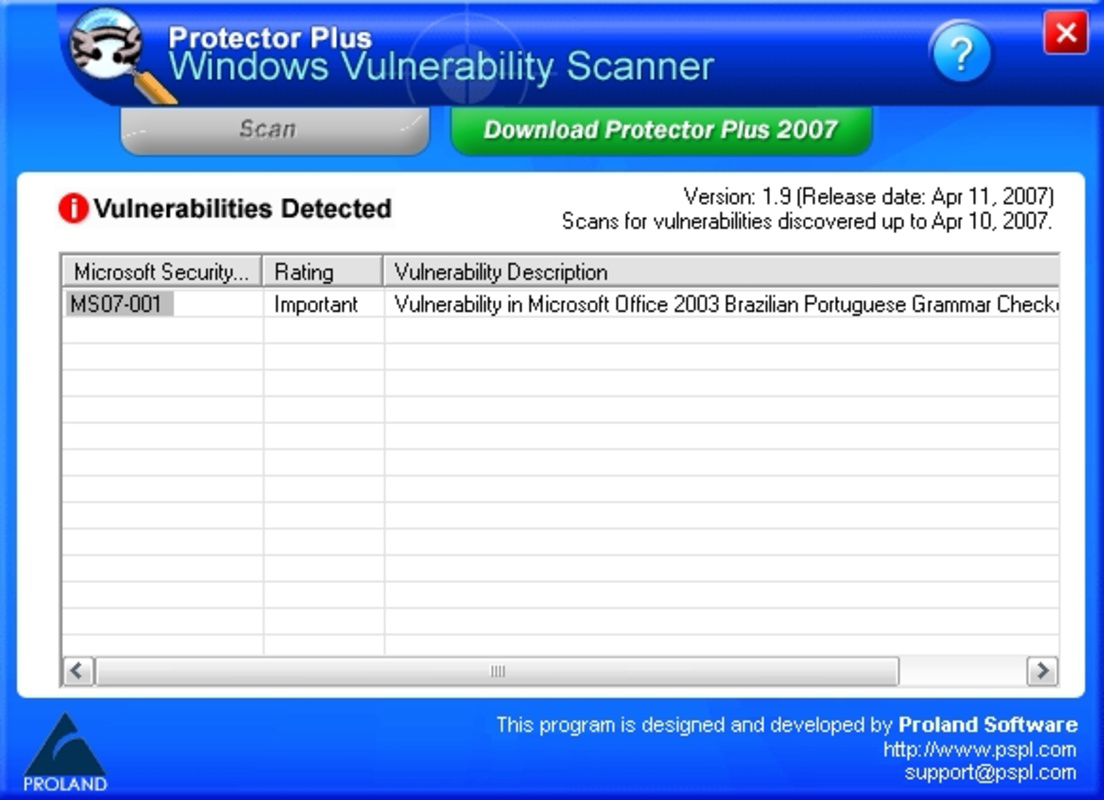
The Windows Vulnerability Scanner, developed by Protector Plus, is a dedicated security tool designed to evaluate the integrity and safety of Windows-based systems. Its primary purpose is to detect existing vulnerabilities within the operating system and installed software, enabling users to take corrective actions before potential exploits occur. This application serves individuals and organizations seeking to maintain a secure computing environment by identifying weaknesses that could be leveraged by malicious actors.
By providing a systematic scan of system components, the tool addresses common security challenges such as outdated software, missing patches, and misconfigurations. It is particularly useful for users who may not have advanced technical knowledge but still require reliable protection for their devices. The target audience includes home users, small business operators, and IT administrators responsible for maintaining system hygiene across multiple machines.
The application operates as a standalone utility, focusing on vulnerability detection without requiring complex configurations. It generates a detailed log file after each scan, allowing users to monitor changes in their system's security posture over time. This historical tracking capability supports proactive maintenance and compliance efforts, especially in regulated environments.
Although the developer did not provide additional technical details about the scanning methodology or update frequency, the tool’s core functionality remains relevant within the broader cybersecurity ecosystem. Its role as a diagnostic instrument for system security underscores its importance in a layered defense strategy, even in the absence of real-time threat monitoring.
Key Features & Functionality
- User-Friendly Interface: The application features an intuitive layout that simplifies the scanning process for users of all experience levels. Navigation is straightforward, with clear labels and accessible controls, reducing the learning curve associated with security tools.
- Comprehensive Vulnerability Scan: The tool performs a thorough examination of the system, detecting known vulnerabilities across the operating system and installed applications. It categorizes findings based on severity, helping users prioritize remediation efforts.
- Patch Location Information: Upon identifying a vulnerability, the scanner provides direct links or references to the official patch sources. This feature minimizes the risk of downloading malicious or unverified updates, enhancing the overall security of the remediation process.
- Detailed Log File Creation: After each scan, the tool generates a log file named
Protector_Plus_Windows_Vulnerability_Scan.htm. This file includes timestamps, detected vulnerabilities, risk levels, and patch recommendations, serving as a valuable reference for audits and future analysis. - Risk Level Assessment: Each vulnerability is assigned a risk classification, enabling users to focus on high-priority threats first. This prioritization supports efficient resource allocation and timely mitigation, especially in environments with limited IT support.
For example, a home user might run the scanner monthly to ensure their system remains protected against known exploits. An IT administrator could integrate the tool into a routine maintenance workflow, using the generated logs to verify compliance with internal security policies. The structured output ensures that both technical and non-technical users can interpret results effectively.
Interface, UX & Performance
The user interface of the Windows Vulnerability Scanner is designed with simplicity and clarity in mind. The layout follows a linear flow, guiding users through the scanning process with minimal distractions. Key functions such as initiating a scan, viewing results, and accessing logs are located in easily identifiable sections, contributing to a smooth user experience.
Visual design elements are minimalistic, focusing on functionality over aesthetics. Text-based output is well-organized, with color-coded indicators for risk levels, improving readability at a glance. Navigation between sections is responsive, and the application does not exhibit lag during routine operations.
Although the developer did not list formal performance metrics, the tool’s file size of 15.4 MB suggests it is lightweight and optimized for efficient execution. It is expected to run smoothly on standard Windows systems, including older hardware configurations. Responsiveness remains consistent across different screen sizes and resolutions, indicating broad compatibility with various desktop and laptop setups.
Stability appears to be a consistent strength, as the application completes scans without crashing or freezing under normal conditions. However, specific requirements for memory usage, CPU load, or background processes were not disclosed. Users are advised to run the tool during low-usage periods to avoid potential interference with other system tasks.
Platform Compatibility & Technical Requirements
The Windows Vulnerability Scanner is designed exclusively for the Windows platform. It is compatible with Windows operating systems, though specific versions were not listed by the developer. This lack of detail means users should verify compatibility with their current system before installation.
The application has a file size of 15.4 MB, indicating it is a lightweight utility that does not require significant disk space. It is available at no cost, making it accessible to a wide range of users, including those with limited budgets for security software.
The software version is listed as 1.0.0, suggesting it may be an initial or stable release. No information was provided about update frequency, automatic update capabilities, or dependency on external libraries. The developer did not specify minimum OS requirements, so users should exercise caution when deploying the tool on systems with outdated Windows versions.
Pros and Cons
Pros
- Free to download and use, making it accessible for budget-conscious users.
- Simple, intuitive interface suitable for non-technical users.
- Generates detailed, timestamped log files for tracking system security over time.
- Provides direct patch download locations, streamlining the remediation process.
- Offers risk-level categorization to help prioritize critical vulnerabilities.
Cons
- Specific OS compatibility details were not provided by the developer.
- No information on update frequency or automatic patching capabilities.
- Developer did not disclose performance benchmarks or system resource usage.
- Limited to Windows platform; no support for macOS or Linux systems.
- Version 1.0.0 suggests it may not receive frequent updates or new features.
FAQ
Is Windows Vulnerability Scanner safe to install?
Yes, the tool is designed as a security diagnostic utility and does not contain malware or intrusive components. However, users should only download it from trusted sources to ensure authenticity.
Can I use this tool on older Windows systems?
The developer did not specify minimum OS requirements. While the lightweight size suggests compatibility with older systems, users should verify functionality on their specific version before installation.
Does the scanner update automatically?
There is no information available about automatic updates. Users may need to manually check for updates or rely on the developer’s release notes for new versions.
Is the tool suitable for business environments?
Yes, the detailed logging and risk assessment features make it useful for small businesses and IT teams managing multiple devices. However, its standalone nature may limit scalability for large organizations.
Where can I download the latest version?
The latest version is available for free download from the official developer website. Users should ensure they are accessing the correct domain to avoid malicious clones.
Final Thoughts
The Windows Vulnerability Scanner stands out as a focused, no-frills security utility that delivers core functionality without unnecessary complexity. Its ability to identify system vulnerabilities, assign risk levels, and provide patch locations makes it a valuable addition to any user’s digital defense toolkit. While it lacks advanced automation and detailed technical specifications, its simplicity and free access make it ideal for individuals and small teams seeking basic yet effective system protection.
For those who value transparency, control, and minimal resource usage, this tool offers a reliable way to perform periodic security audits. Its detailed log files also support compliance and long-term monitoring, adding practical value beyond immediate threat detection.
Although it may not replace comprehensive enterprise-grade solutions, it fills a niche for users who want a straightforward way to assess their system’s security posture. With regular use, it can significantly reduce exposure to known exploits.
Download Windows Vulnerability Scanner now
Guides & Tutorials
How to install Windows Vulnerability Scanner
- Click the Download button above.
- Once redirected, accept the terms and click Install.
- Wait for the Windows Vulnerability Scanner download to finish on your device.
How to use Windows Vulnerability Scanner
This software is primarily used for its core features described above. Open the app after installation to explore its capabilities.
User Reviews
No reviews yet. Be the first to share your experience.
You may also like
more
Que no te pillen¡
About !Que no te pillen¡Reviewed by Jason A. BilbreyShow MoreShow Less

3D Combat Zone
About 3D Combat ZoneOriginally released in 1983, 3D Combat Zone immerses players...

666: El día del portal
About 666: El día del portalOn June 6, 2006, Agent P. Stone uncovers a sinister...

80 in 1 Best Flash games
About 80 in 1 Best Flash games 80 in 1 Best Flash games is a collection of 80 fl...

ABYSS SEEKERーーWhat Do You See Deep in The Abyss
About ABYSS SEEKERーーWhat Do You See Deep in The AbyssIn ABYSS SEEKER, players...

ACA NEOGEO THE KING OF FIGHTERS 2002 for Windows
About ACA NEOGEO THE KING OF FIGHTERS 2002 for WindowsTHE KING OF FIGHTERS 2002,...